Why I Built Command Reopen
The story behind Command Reopen: switching to macOS in 2020, getting frustrated by Cmd+Tab window switching behavior, and building a zero-permission utility.
On this page
Background
A Mac is expensive to switch to, but once you’re used to it, you can’t leave. After graduating in 2020 I used a Mac for the first time. I had to study a Mac “white paper” guide, watch YouTube courses, and have people ahead of me walk me through three-finger drag and four-finger swipe between desktops before I got the hang of it.
macOS has its own design logic; sometimes you can’t tell if it’s careful or just stubborn. If you’re coming over with muscle memory from other operating systems, a few things are bound to trip you up.
Take what happens when you close an app’s window with Cmd + W or minimize it with Cmd + M:
- The app doesn’t quit; it still shows up in the
Cmd + Tabapp switcher. - But because the window was closed or minimized, switching back to that app with
Cmd + Tabwon’t bring it up.
I went looking for ways to deal with this, and found roughly three answers:
- Hide apps with
Cmd + Hinstead of closing or minimizing them. Hidden apps do restore windows viaCmd + Tab(which completely goes against my habits). - Select the app in
Cmd + Tab, holdOption, then releaseCmd, and the window appears (I’ve literally never managed to pull this key combo off). - Activate it from the Dock (…)
Eventually I’d had enough and vibe-coded an app to fix it.
How Command Reopen Works
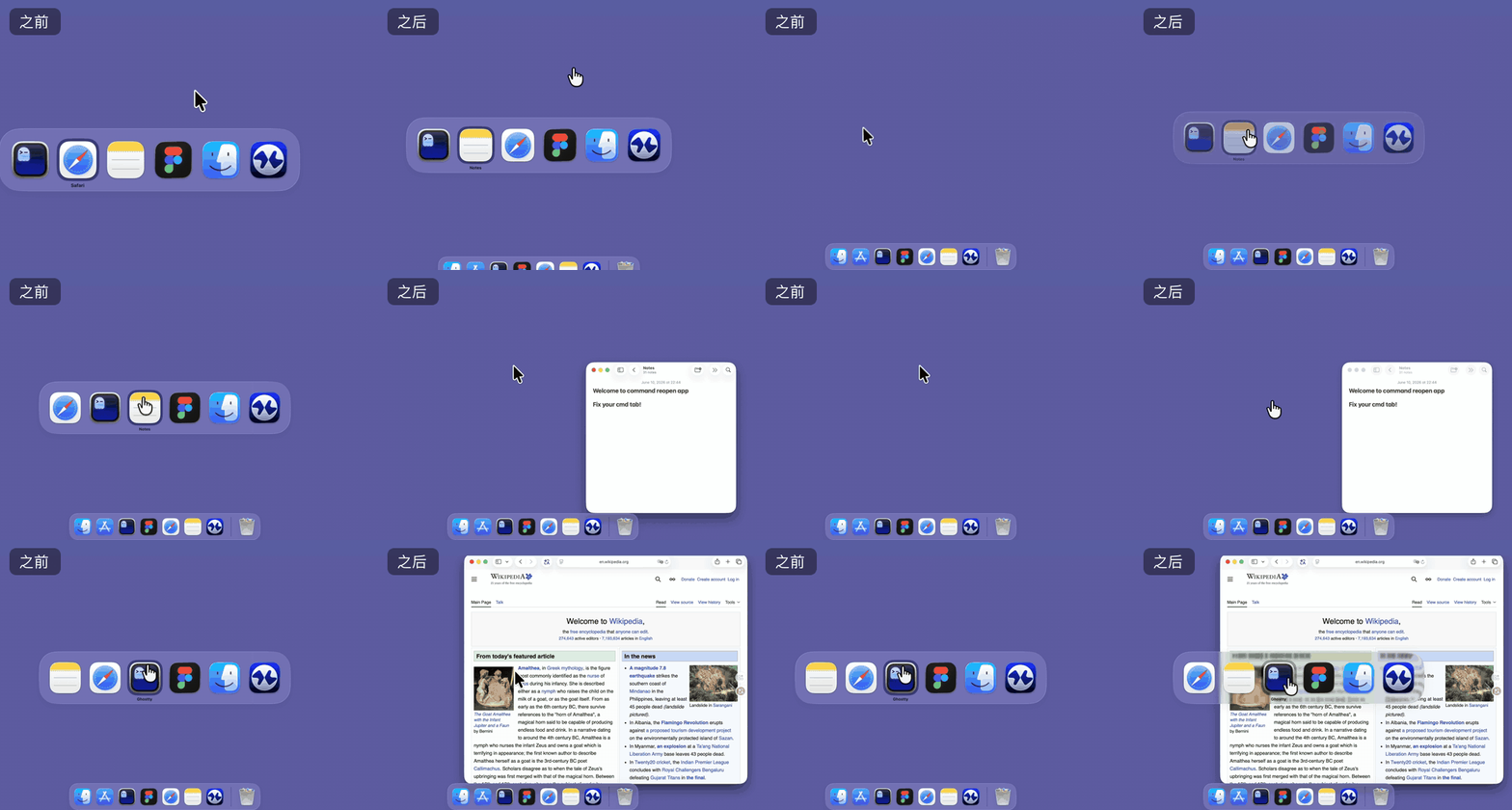
During the days this was driving me crazy, I took a closer look at how Cmd + Tab actually behaves: when you switch to an app with no open windows, macOS actually brings it to the foreground—it just doesn’t open a window.
So the approach behind Command Reopen is pretty straightforward: listen for system foreground app switches, and as soon as an app arrives in the foreground without any visible window, send a “reopen” command to wake it up.
For a closed window, the target app may choose to open a new window, but Command Reopen does not restore closed documents or tabs.
Existing solutions (notably AltTab) often do complex window management—previews, rearranging, even redrawing and covering the native Cmd + Tab UI—and usually need Accessibility permission or even Screen Recording permission.
Command Reopen only fixes this one thing. It doesn’t change system UI or run complex logic—it just adds a window-activation step. For daily use, that’s enough.
Limitations of Going Zero-Permission
Because it refuses sensitive system permissions, the current approach has two hard limits:
1. Lack of Window-Level Control
Window-level control needs Accessibility (AX) permission, so Command Reopen can only wake apps, not individual windows. For example, if an app has multiple minimized windows, the target app itself decides which window to show—you cannot pick a specific window to activate.
2. Reliant on Apps Following Native macOS Window Standards
The mechanism needs the target app to implement macOS window APIs properly so it can answer system activation. Because Command Reopen delegates the reopen event to macOS, the target app decides which window appears and may not respond. If an app’s window management is a non-standard, hand-rolled setup, it may not work.
In testing, a user found that Feishu Meetings (launched from Feishu / Lark) takes its own Dock icon and completely ignores Command Reopen’s activation. There may be other non-standard apps we haven’t found yet.
Still, after half a year of daily use, most mainstream apps work fine.
Pricing & What’s Next
- App Store
- Lifetime $9.99
- GitHub (open source)
After shipping Command Reopen, I wondered whether to make a tiny app for every similar papercut—macOS has so many small things you could polish. I knocked out two more and stopped. You won’t install a hundred apps; bundled tools that fix many papercuts fit this better—like Raycast and Supercharge.

Command Reopen · Mac App Store
Make Command-Tab bring your windows back.
- Restores minimized windows when you switch apps
- Opens a new window when an app has none
- No Accessibility or Screen Recording permission
7-day free trial · $9.99 one-time
More from the Blog
Mac Window Switcher and Manager Apps for Windows Users
Alt+Tab-style switching on a Mac needs an app such as AltTab; Windows-style snapping is built in since macOS 15. Switchers and window managers compared.
How to Change Command-Tab on Mac, and What You Can't Change
What you can change about Command-Tab on Mac: the jump to another desktop, showing all of an app's windows, same-app window switching, and more.